When a Ryobi lawn mower won’t start, Ryobi’s manuals point to a flat battery, a missing start key or a handle out of operating position first. Then check the grass catcher, a tilt past 45 degrees, blade overload and battery heat.
A Ryobi lawn mower won’t start for a short list of reasons, and nearly all of them are lockouts rather than broken parts. Every current Ryobi walk-behind sold in the U.S. is battery-powered or corded (Ryobi lawn mower lineup, Nov. 16, 2026), so there is no fuel, choke or spark plug to blame. What differs is the lockout list: the 20-inch RY401018 will not run without its grass catcher or mulch plug fitted, the 80V RYPM8001 ships with its battery plug disconnected, and the 21-inch RY40HPLM01 flashes 2 inner lights when the blade is overloaded.
This page puts the troubleshooting tables from 7 U.S. Ryobi operator’s manuals side by side, with the PDF page for each fix, and decodes the light patterns on the mower dashboard, the 40V battery and the OP406 charger. Videos and forum threads that rank for this query usually cover one model. If your mower runs on gas or you want the brand-neutral checklist, our guide on why a lawn mower is not starting covers fuel, spark and carburetor faults; Toro owners have a Toro no-start guide by model number.
First: is your Ryobi on the 2025 recall list?
Check the model before troubleshooting. CPSC recall 25-127 (Feb. 6, 2025) covers about 217,500 RYOBI 40V HP brushless 21-inch walk-behinds, models RY401014, RY401015, RY401140, RY401150, RY401020 and RY401200 (with BTLUS, US and US-Y suffixes) with serial numbers KC21032D010001 to KC21327N999999, sold February 2021 to January 2025. A push-on connector in the powerhead can overheat: TTI logged 97 overheating reports and 5 fires. The model and serial label is on the mower inside the green housing.
If yours is on the list, stop using it rather than fixing a no-start. CPSC says to contact TTI at 800-597-9624 for instructions to disable the mower and get a free replacement 21-inch mower. Other mower recalls tied to smoke and heat are listed in our page on why a lawn mower is smoking.
Ryobi no-start causes, model by model
The table below merges the “Mower not starting” rows from each manual’s troubleshooting chart with the lockouts printed in its starting and features sections. A cause listed for one model is not printed for the others, so check the column for yours. The 13-inch P1108 and 16-inch P1109 are 18V ONE+ mowers; the RY4 models run on 40V packs; the RYPM8001 manual is the one Ryobi links for the 80V 30-inch kit sold as RYPM8010 (RYPM8010 support page).
Swipe the table sideways to see every column.
| Cause the manual names | Models whose manual prints it | Fix in the manual | Source (PDF page) |
|---|---|---|---|
| No response, battery gauge shows 0 or 1 light | All 7 | Charge the battery. Ryobi Australia asks for at least 2 lights on the gauge before starting. | RY40HPLM01 p. 18; Ryobi AU support |
| Start key not installed or loose | RY40HPLM01, RY40HPLM03, RY401018, RY401011, RYPM8001, P1108 | Insert the start key; on the 21-inch HP models it goes in the slot between the 2 battery ports. | RY40HPLM01 p. 14; P1108 p. 15 |
| Handle not in the operating position | RY40HPLM01, RY40HPLM03, RY401018, RY401011, RYPM8001, P1108 | Raise the lower and upper handle until the adjustment pins, knobs or lock clips latch. | RY401011 p. 18; RYPM8001 p. 17 |
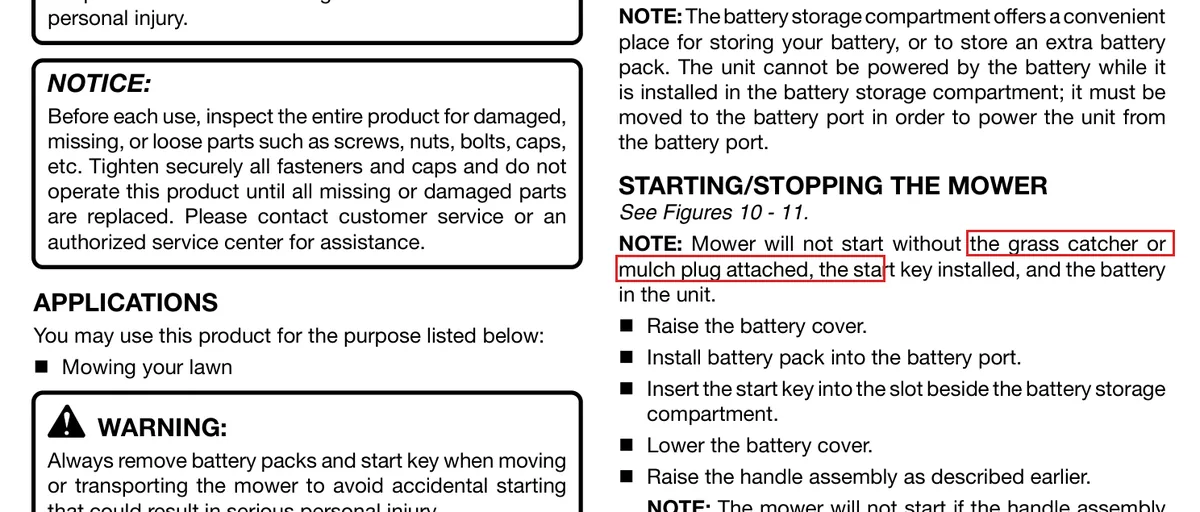
| Grass catcher, mulch plug or side chute missing or loose | RY401018, RY401011 | Refit the catcher, mulch plug or side discharge accessory until it seats. | RY401018 p. 14; RY401011 p. 18 |
| Battery sitting in the storage compartment | RY401018, RY401011 | Move the pack to the battery port; a pack in the storage slot cannot power the mower. | RY401018 p. 14 |
| Debris on the battery terminals | RY40HPLM01, RY40HPLM03 | Clear the nodes and terminals in the battery compartment with a dry cloth. | RY40HPLM03 p. 21 |
| Quick-connect plug not connected | RYPM8001 (80V) | Connect the battery’s quick-connect plug; the mower ships with it disconnected. | RYPM8001 pp. 13, 17 |
| Mower vertical or tilted more than 45 degrees | RY40HPLM01, RY40HPLM03, RY401018, RY401011, RYPM8001 | Set the deck flat on level ground; the tilt sensor blocks starting past 45 degrees. | RY40HPLM01 p. 11; RY401018 p. 11 |
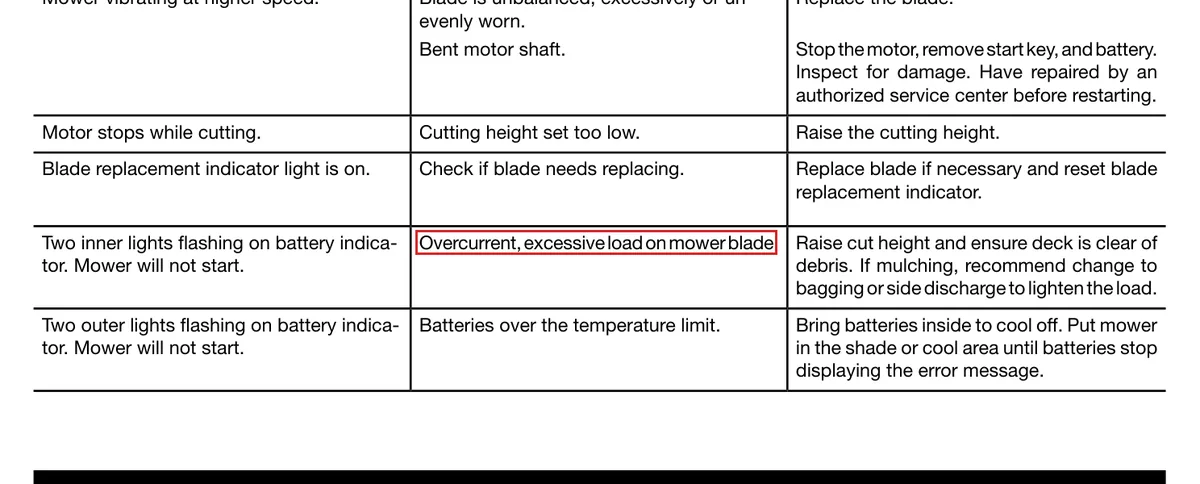
| 2 inner lights flashing on the battery indicator | RY40HPLM01, RY40HPLM03 | Overcurrent: raise the cut height, clear the deck, and switch from mulching to bagging or side discharge. | RY40HPLM01 p. 18; RY40HPLM03 p. 21 |
| 2 outer lights flashing on the battery indicator | RY40HPLM01, RY40HPLM03 | Batteries over the temperature limit: bring the packs inside and park the mower in shade until the lights stop. | RY40HPLM01 p. 18; RY40HPLM03 p. 21 |
| Battery pack overheated | P1109 (18V) | Let the pack cool or try a different pack. | P1109 p. 15 |
| Motor stops while cutting | All 7 | Raise the cutting height. | RY401018 p. 18; P1109 p. 15 |
| Stops mid-mow and will not restart | 40V packs | Release the bail to reset the pack’s protection; if it still will not run, recharge. | 40V battery manual p. 1 |
| Blade jammed with clippings or debris | Ryobi AU support list | With battery and key out, wear gloves, tip the mower on its side and clear the blade until it spins freely. | Ryobi AU support |
1Is it a 40V HP 21 in model RY401014, RY401015, RY401140, RY401150, RY401020 or RY401200 with serial KC21032D010001 to KC21327N999999?
YesRecalled (CPSC 25-127): stop using it and call TTI at 800-597-9624 for a free replacement.
NoGo to the next question
2Does the battery gauge show 0 or 1 light?
YesCharge the pack until the OP406 charger light is solid green.
NoGo to the next question
3Is the start key missing or loose, or the 80V quick-connect plug unplugged?
YesSeat the key firmly in its slot; connect and latch the 80V plug.
NoGo to the next question
4Is the handle below its operating position or a handle lock unlatched?
YesRaise both handle sections until the pins, knobs or clips lock.
NoGo to the next question
5On a 20 in RY401018 or RY401011, is the catcher or mulch plug off, or the pack in the storage slot?
YesFit the catcher or plug and move the pack to the battery port.
NoGo to the next question
6Are 2 outer lights flashing, or did the pack just come off a hot mow?
YesToo hot: cool the packs indoors and park the mower in shade.
NoGo to the next question
7Are 2 inner lights flashing, or is the grass tall or wet?
YesOverload: raise the deck, clear clippings, switch from mulching to bagging or side discharge.
NoGo to the next question
8With key and pack out, is the blade jammed?
YesClear it with gloves until it spins freely.
NoStill dead: take it to a Ryobi authorized service center (1-800-525-2579); 40V and 80V mowers carry 5 years of household warranty.
Ryobi’s Australian support article adds two checks no U.S. manual prints: a grass catcher so full it strains the motor, and a blade jammed by clippings (Ryobi AU, Jan. 13, 2026). Both fit the overcurrent code above. Wet grass makes both worse; Ryobi’s own mowing tips say not to cut it because clippings stick under the deck, and our page on mowing wet grass sets out each maker’s rule.
Start it in the order your manual prints
Ryobi does not print one starting sequence. Four manuals say to pull the bail first, then press the start button; the RY401011, P1108 and P1109 say to press and hold the button, pull the bail or blade levers, then let go of the button. Four of the 7 add a note that the other order also works. The two 18V manuals and the 80V manual print no such note, so on a P1108, P1109 or RYPM8001 follow the printed order exactly.
| Model | Platform and deck | Printed starting order | Other order allowed? | Where the start key goes | Manual (PDF page) |
|---|---|---|---|---|---|
| RY40HPLM01 | 40V HP, 21 in, self-propelled | Pull bail, press and release start button | Yes | Slot between the 2 battery ports | RY40HPLM01 p. 14 |
| RY40HPLM03 | 40V HP, 21 in, AWD multi-blade | Engage bail, press start button | Yes | Slot inside the battery compartment | RY40HPLM03 p. 15 |
| RY401018 | 40V, 20 in | Pull bail, press and hold start button | Yes | Slot beside the battery storage compartment | RY401018 p. 14 |
| RY401011 | 40V, 20 in push | Press and hold button, pull bail, release button | Yes | Slot beside the battery storage compartment | RY401011 p. 14 |
| RYPM8001 (RYPM8010 kit) | 80V HP, 30 in, self-propelled | Engage bail, press start button | Not printed | Slot inside the battery compartment; quick-connect plug in | RYPM8001 p. 13 |
| P1109 | 18V ONE+, 16 in | Press and hold button, pull blade control levers, release button | Not printed | Slot beside the battery port | P1109 p. 12 |
| P1108 | 18V ONE+, 13 in | Press and hold button, pull bail, release button | Not printed | Slot beside the battery port | P1108 p. 12 |
Two lockouts catch owners of the 20-inch RY401018 and RY401011. Both have a battery storage compartment next to the battery port, and the manuals say a pack in the storage slot cannot power the mower (RY401018 manual, p. 14). The start key also sits beside that compartment, so check you have not slid the pack into the wrong opening.
Starting steps for gas walk-behinds, with primer counts and choke settings, are in our guide on how to start a lawn mower; Ryobi’s battery mowers have none of those steps.
Lights come on but the blade won’t spin
Lights on means the pack is connected and has charge, so the fault is a lockout or an overload. On self-propelled models the drive can run with the blade off: the RY40HPLM01 manual says to pull the bail and then one or both self-propel levers to move the mower without engaging the blade (RY40HPLM01 manual, p. 15). A mower that drives but will not cut has power; check the bail-and-button order, the catcher or mulch plug, and the dashboard lights.
The two HP models with a dashboard print two flashing codes in their troubleshooting charts (RY40HPLM01, p. 18; RY40HPLM03, p. 21). Two inner lights mean overcurrent from too much load on the blade; two outer lights mean the batteries are over their temperature limit. Neither manual prints a code for a dead pack, so a dark dashboard after a full charge points to the pack, its contacts or the key.
| Where | Light pattern | Meaning | What the manual says to do | Source (PDF page) |
|---|---|---|---|---|
| Mower dashboard (RY40HPLM01, RY40HPLM03) | 2 inner lights flashing | Overcurrent, blade overloaded | Raise cut height, clear deck, switch to bagging or side discharge | RY40HPLM01 p. 18 |
| Mower dashboard (RY40HPLM01, RY40HPLM03) | 2 outer lights flashing | Batteries over temperature limit | Cool packs indoors, mower in shade | RY40HPLM03 p. 21 |
| Mower dashboard (RY40HPLM01) | Blade replacement light red | Blade hours reached | Check or replace blade; reset with 5 presses of the start button within 3 seconds | RY40HPLM01 p. 15 |
| 40V battery fuel gauge | Press the gauge button | 5 bands: 0 to 10, 10 to 25, 25 to 50, 50 to 75 and 75 to 100 percent | Charge a pack in the lowest band before mowing | 40V battery manual p. 2 |
| OP406 charger | Red on, no pack | Ready to charge | Insert pack | OP406 manual p. 5 |
| OP406 charger | Orange on, green off | Pack too hot or too cold | Wait; charging starts on its own | OP406 manual p. 5 |
| OP406 charger | Green flashing | Charging | Leave on charger | OP406 manual p. 5 |
| OP406 charger | Green solid | Fully charged | Remove pack; LED turns off after 10 minutes | OP406 manual p. 5 |
| OP406 charger | Red and green flashing | Pack or charger error | Reseat once; if repeated, try another pack. If a second pack also errors, replace the charger | OP406 manual p. 5 |
| OP406 charger | No LEDs lit during charging | Fault | Remove the pack; do not insert another; take both to a service center | OP406 manual p. 4 |
Overcurrent is the code tall, thick or wet grass triggers. The manuals’ fix is mechanical, not electrical: raise the deck, since Ryobi recommends cutting no more than 1/3 of the grass length per pass, and clean the underside after each mow (RY40HPLM01, p. 15). If your lawn keeps tripping it, mow more often so each cut stays inside that 1/3 rule.
Too hot, too cold, or a pack that won’t charge
Ryobi’s 40V battery manual sets 2 temperature windows. Use the pack between -4°F and 120°F; charge and store it between 50°F and 100°F, and do not store it outside or in a vehicle (40V battery manual, p. 1). Below freezing, put the pack on the mower and run it at light load for about a minute and it warms up and runs normally (p. 2). For storage over 30 days, keep packs below 80°F at 30 to 50 percent charge and top them up every 6 months.
A pack that just came off a hot mow will sit on the OP406 rapid charger with the orange light on and not charge until it cools; a pack from a cold garage does the same until it warms (OP406 manual, pp. 4 and 5). The 18V P1109 manual lists an overheated pack as a no-start cause on its own and says to let it cool or swap packs (P1109, p. 15). Charging steps, amp settings and other brands’ temperature windows are in our guide on how to charge a lawn mower battery.
Is there a reset button on a Ryobi mower?
None of the 7 manuals shows a reset button for a no-start. The reset Ryobi prints is in the 40V battery manual: if the tool stops during use, release the trigger to reset the pack’s protection and resume; on a mower the bail is the trigger. If it still will not run, the pack needs charging (40V battery manual, p. 1). Ryobi Australia’s checklist adds a reseat: take the pack out, wipe both sets of contacts with a dry rag and push it back in until you hear a click (Ryobi AU).
The only button sequence the manuals call a reset is for the blade replacement light on the RY40HPLM01: reinstall the key and packs, pull and release the bail to wake the dashboard, then press and release the start button 5 times within 3 seconds (RY40HPLM01, p. 15). Ryobi suggests a new blade every season or when that light turns on; our guide on sharpening a mower blade lists blade-nut torque for the RY401018 at 310 to 360 in-lb.
A brand-new Ryobi that won’t start
New mowers fail on setup, not parts. The OP406 charger manual says packs ship in a low-charge condition and should be charged before first use (OP406, p. 4). The 80V RYPM8001 ships with its battery disconnected; connect the quick-connect plug and lock the latch (RYPM8001, p. 13). Then check the 4 items each new owner skips:
- Charge the pack until the charger LED stays solid green (OP406, p. 5).
- Insert the start key, which ships loose in the box, into its slot (P1108 packing list, p. 10).
- Raise and lock the handle in its operating position; on the HP models make sure the adjustment pins snap in (RY40HPLM01, p. 18).
- On 20-inch RY401018 and RY401011 mowers, fit the grass catcher or mulch plug before the first start (RY401018, p. 14).
Whether a self-propelled deck is worth the extra weight and battery draw is covered in self-propelled vs push mower.
Older gas and corded Ryobi mowers
Ryobi’s U.S. lawn mower page listed 18V, 40V and 80V battery mowers and one corded model, the 11 Amp 13-inch RYAC130, on Nov. 16, 2026, and no gas walk-behinds (Ryobi lineup). Ryobi’s support page for the RYAC130 links its warranty but no operator’s manual (RYAC130 support page), so no manual-based checklist exists for it here.
If you own an older gas mower with a Ryobi badge, the engine maker’s rules apply: fresh fuel under 30 days old, the spark plug and the carburetor, all covered with gap specs and carburetor steps in our lawn mower not starting checklist. The sibling page Craftsman lawn mower won't start covers Craftsman’s gas and battery models.
When it’s a warranty claim
Every troubleshooting chart ends the same way: if these fixes fail, contact an authorized service dealer. Ryobi’s service page offers mail-in Rapid Repair, completed in 14 days on eligible items, or a service-center locator, and warns that not every center repairs every Ryobi tool, so call first (Ryobi Service and Repair). The help line printed in the manuals is 1-800-525-2579. Coverage depends on the model and on home or commercial use:
| Product | Household use | Commercial use | Source (PDF page) |
|---|---|---|---|
| RY40HPLM01, RY40HPLM03 (40V HP, 21 in) | 5 years | 1 year | RY40HPLM01 p. 18 |
| RY401018, RY401011 (40V, 20 in) | 5 years | 90 days | RY401018 p. 18 |
| RYPM8001 (80V HP, 30 in) | 5 years | 90 days | RYPM8001 p. 17 |
| P1109 (18V, 16 in) | 3 years | 1 year | P1109 p. 15 |
| P1108 (18V, 13 in) | 3 years | 90 days | P1108 p. 15 |
| 40V battery packs (OP40602 series) | 3 years | 1 year | Battery manual p. 2 |
| OP406 40V rapid charger | 3 years | 1 year | OP406 p. 5 |
Keep the receipt, and note the model and serial numbers before you call. A mower and its pack carry separate terms: a 40V mower carries 5 years of household cover and its pack 3. Shop rates for out-of-warranty work are in our page on lawn mower repair cost.
How we compiled this
On Nov. 16, 2026 we read 9 Ryobi U.S. manuals linked from ryobitools.com support pages (7 mower operator’s manuals, the 40V battery manual and the OP406 charger manual), Ryobi’s U.S. lawn mower listing, Ryobi Australia’s no-start support article and CPSC recall 25-127. Every fix cites a manual and its PDF page. We did not test any mower; videos and forum threads were read only to see which questions owners ask.
Frequently asked questions
My Ryobi lawn mower lights are on, but it won’t start. What could be the problem?
The pack has charge, so look for a lockout: a loose start key, a handle not latched, a missing grass catcher or mulch plug on 20-inch models, or a flashing code. On the RY40HPLM01 and RY40HPLM03, 2 inner lights flashing means blade overload and 2 outer lights mean the packs are too hot (RY40HPLM01, p. 18).
Is there a reset button on a Ryobi lawn mower?
No. Ryobi’s 40V battery manual says to release the trigger, on a mower the bail, to reset the pack’s protection, then recharge if it still will not run (battery manual, p. 1). The only printed button reset is for the RY40HPLM01 blade light: 5 presses of the start button within 3 seconds.
Why won’t my Ryobi mower start with a full battery?
With a charged pack, Ryobi’s charts point to the start key, the handle position, the catcher or mulch plug on 20-inch models, a pack left in the storage slot, dirty terminals, or a tilt past 45 degrees (RY401018, pp. 11 and 14). Pull the bail before pressing the button, or hold the button first on the P1108 and P1109.
Why is my 18V Ryobi mower not starting?
The P1109 16-inch manual lists two causes: a low battery and an overheated pack; cool it or try another (P1109, p. 15). The P1108 13-inch adds a missing start key, and both 18V manuals print the order as press and hold the start button, pull the bail or levers, then release the button.
Why won’t my brand new Ryobi mower start?
Ryobi ships packs in a low-charge state, so charge first until the OP406 light is solid green (OP406, pp. 4 and 5). The 80V RYPM8001 also ships with its battery plug disconnected. Then insert the start key and latch the handle in its operating position.
Sources
- Ryobi (TTI), RY40HPLM01 21 in. 40V Brushless Self-Propelled Lawn Mower Operator’s Manual, 999000428, current PDF (rev. 04). Accessed November 2026.
- Ryobi (TTI), RY40HPLM03 40V HP Brushless 21 in. AWD Multi-Blade Mower Operator’s Manual, 999000568, June 18, 2025. Accessed November 2026.
- Ryobi (TTI), RY401018 20 in. 40 Volt Lawn Mower Operator’s Manual, 998000762, Sept. 8, 2021. Accessed November 2026.
- Ryobi (TTI), RY401011 20 in. 40 Volt Lawn Mower Operator’s Manual, 995000921, Sept. 2, 2020. Accessed November 2026.
- Ryobi (TTI), RYPM8001 80V 30 in. Lawn Mower Operator’s Manual, 999000149, May 10, 2023. Accessed November 2026.
- Ryobi (TTI), P1109 18 Volt 16 in. Lawn Mower Operator’s Manual, 998000291, June 25, 2024. Accessed November 2026.
- Ryobi (TTI), P1108 13 in. 18 Volt Lawn Mower Operator’s Manual, 998000330, Sept. 17, 2020. Accessed November 2026.
- Ryobi (TTI), 40V Lithium-Ion Battery Pack OP40602/OP40603/OP40752/OP40753/OP40122 Operator’s Manual, 995000925, May 24, 2023. Accessed November 2026.
- Ryobi (TTI), OP406 40V Lithium-Ion Rapid Charger Operator’s Manual, 995000943, Aug. 9, 2024. Accessed November 2026.
- Ryobi (TTI), Lawn mowers (U.S. product listing), checked Nov. 16, 2026. Accessed November 2026.
- Ryobi (TTI), 11 Amp Electric 13 in. Mower RYAC130 support page, checked Nov. 16, 2026. Accessed November 2026.
- Ryobi (TTI), Service Centers, checked Nov. 16, 2026. Accessed November 2026.
- Ryobi Australia, What to do if your RYOBI Mower won’t turn on?, Jan. 13, 2026. Accessed November 2026.
- U.S. Consumer Product Safety Commission, TTI Outdoor Power Equipment Recalls RYOBI Battery-Powered Mowers Due to Fire Hazard (25-127), Feb. 6, 2025. Accessed November 2026.